The Casu guide
One paste to install, five minutes to learn. Everything below works the same whether the money is fake or real.
1 · Install
Install free. Casu opens in mock, which needs no key:
Windows (paste into PowerShell):
Mac (paste into Terminal):
Subscribed? Your purchase email has the same command with your key already in it, or paste the key later in Settings, License.
One paste downloads Casu with its own runtime (no prerequisites, no admin rights), activates your license if the command carries one, sets it to start at login, and opens the terminal at http://casu.localhost:22780, an address on your own machine, not a website. Re-running it later updates in place and never touches your config or trading data.
Add your exchange API key
Mock needs no key. For paper or live, open Settings, Exchange API, paste the key ID and private key file from your exchange account, and click Save and check. The key stays on your machine and is never sent to casu.io.
Uninstalling later
Windows:
Mac:
Removal is as clean as the install: config, exchange key and trading data are kept by default, so a reinstall picks up where you left off. Your subscription is separate: cancel anytime from the link in your purchase email.
2 · Pick an environment
Three environments, switched from the settings menu:
- MOCK is where the install leaves you: synthetic markets, fake money, no network, no keys, free. Learn the screen here.
- PAPER (subscription) trades the real live market with a $1,000 pretend balance (Reset restores it), using an exchange API key only to read prices. Real speed, real spreads, fake money.
- LIVE (subscription) is real money, with the same key as paper. The check after saving says Connected, or names what is wrong (a funding line means your money sits on the wrong exchange instance, and links the transfer page that fixes it). LIVE always asks for a real-money confirmation.
The engine behind it all starts at login and restarts on failure, so armed stops survive a reboot.
3 · Place orders
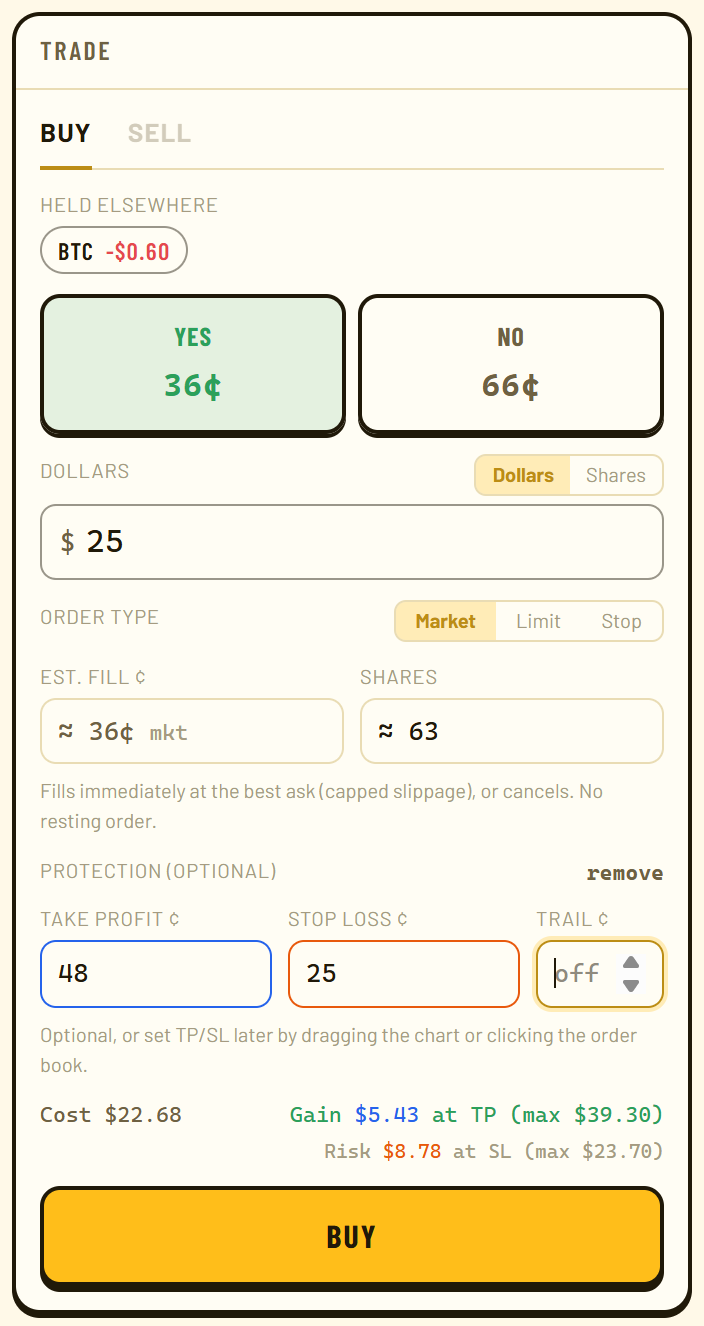
The ticket buys YES or NO, sized in dollars or shares. Every order takes a second click to confirm. Three ways in:
- Market fills now, through the ask. If your size is bigger than what is for sale near the price, an amber Slippage line says what a share will really cost before you confirm.
- Limit rests at your price and fills only if the market trades through it.
- Buy-stop fires a market buy when the price reaches your trigger, with your exits already attached. It never chases: the fill is capped a few cents past your trigger, so a fast break can leave it unfilled rather than filled badly.
4 · Protect the position
Attach exits on the ticket as you enter, or flip on edit levels later and drag the lines on the odds chart or click a level in the order book. However set, they run in the engine, not the browser, and are saved to disk the moment you set them:
- Take-profit sells when the bid on your side reaches your level.
- Stop-loss sells when the bid falls to yours.
- Trailing stop is a distance in cents: the engine ratchets the stop up behind your position’s peak, never down.
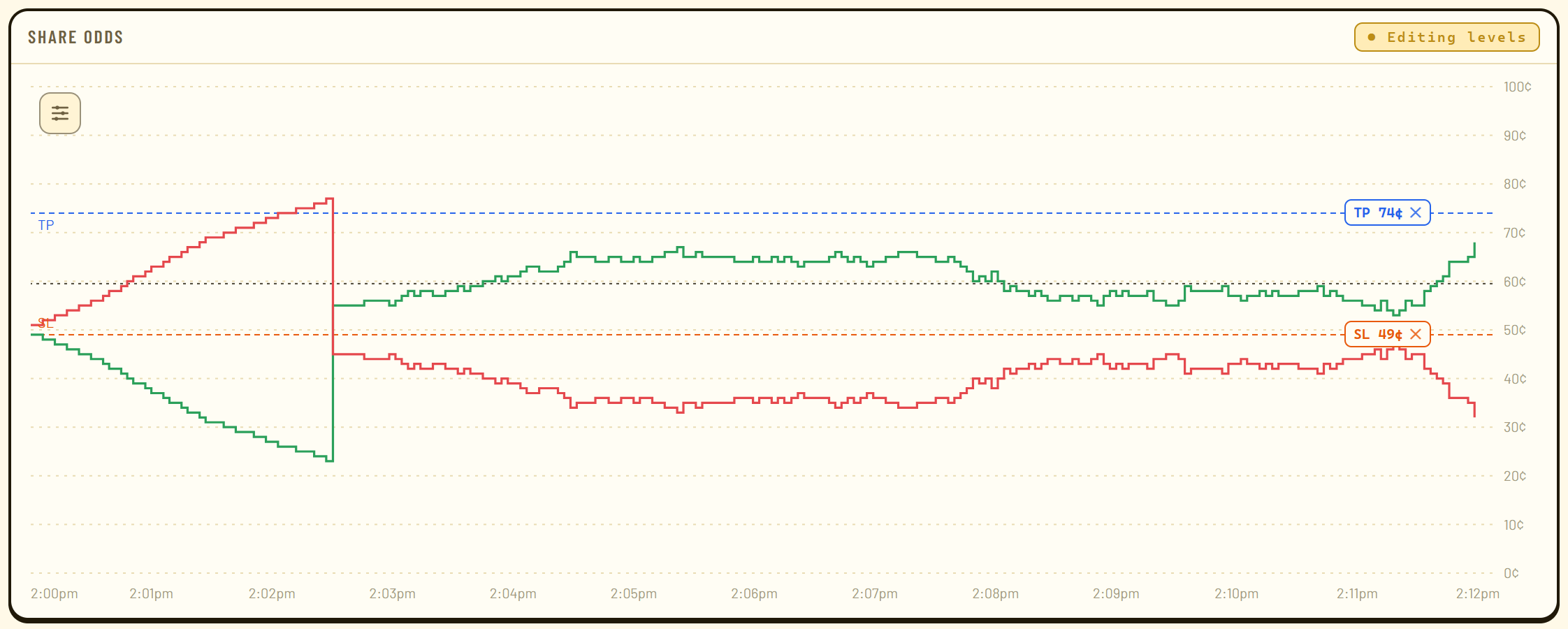
One rule worth learning early: the bid sits below your fill by the spread, so give a stop-loss room below the bid, not below what you paid, or it can fire immediately.
5 · Read the signals
Everything beyond price is a measured readout, never a buy signal:
| Readout | What it answers |
|---|---|
| Cross odds | Spot is this far from the strike with N minutes left: how often did it end up on the other side? |
| Swing odds | How often did a contract at this price move Δ¢ before the bell? |
| Streak | How often did a run of N same-direction windows continue? |
| Lead flips | How often did the leading side change again before settlement? |
All four are base rates from that market’s own settled history over a rolling 28 days. A cell with too little history shows nothing: a gap, never a guess.
6 · Everything else, briefly
- Reverse, beside Sell, sells what you hold and buys the other side in one order, sized to the same dollars or the same contracts under Settings.
- Keyboard shortcuts:
bbuys,ssells,rreverses,yandnpick a side,hsets the sell amount to half,zmoves the stop-loss to entry,xcancels orders,[and]switch markets. Every key is rebindable in settings. - Daily loss limit: the most you are willing to lose in a day. Once hit, Casu refuses new orders until midnight; everything that reduces risk keeps working.
- One-tap trading drops the two-step confirm, for when you want the speed.
- Performance: the Today figure in the header opens a calendar colored by each day’s P&L, kept per environment.
- Alert sounds and dark mode are single switches, and Send feedback writes the bug report for you.
- Coding agent (optional): point Claude Code, Cursor, Codex, or any MCP host at your install to ask about positions and manage exits. Out of the box it can never open a position. Set it up in one paste →